
Set up webhook delivery, verify incoming requests, and save Mindstamp data in your application.
Send view results, viewer interactions, and lead records to your application. Mindstamp sends an HTTP POST request to the URL you configure. The request body contains one JSON object.
Use the data to update a training record, store a question response, or create a contact in your CRM.
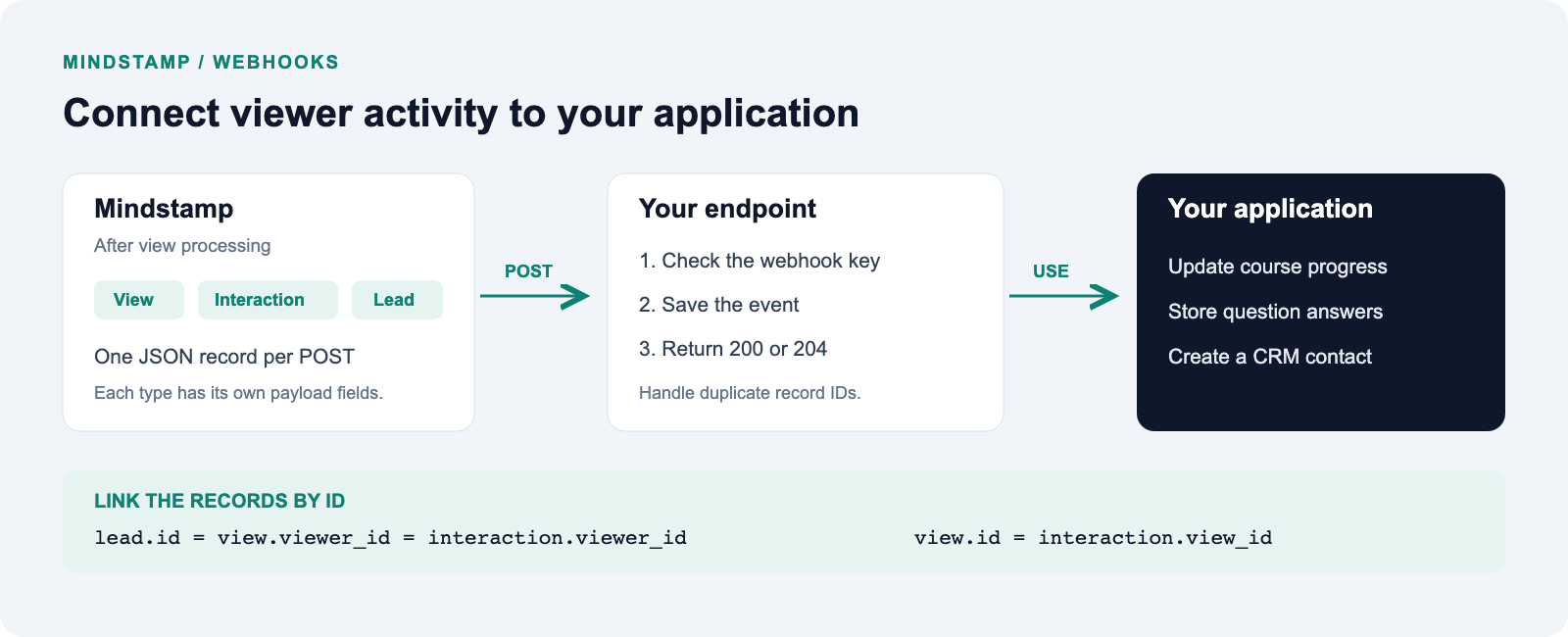
Choose the webhook type
| Type | What you receive | Example use |
|---|---|---|
| View | A view snapshot with watch progress, scores, variables, interactions, and question responses | Update a learner's course record |
| Interaction | One recorded answer, click, or other interaction | Save an answer or record a button click |
| Lead | A known viewer's identity, variables, and stored totals | Create or update a CRM contact |
A view is a watch session. A viewer is an identity record that can have more than one view. Lead webhooks contain viewer records.
Set account URLs
- Open Integrations from the main menu.
- Open Mindstamp API.
- In Endpoints, enter a URL for each webhook type you need. Your server must accept POST requests at these URLs.
- Use Your Webhook Key to check incoming requests. Keep the key on your server.
The fields save after you enter a value. Wait for the save confirmation before leaving the page. A webhook key is separate from a REST API token.
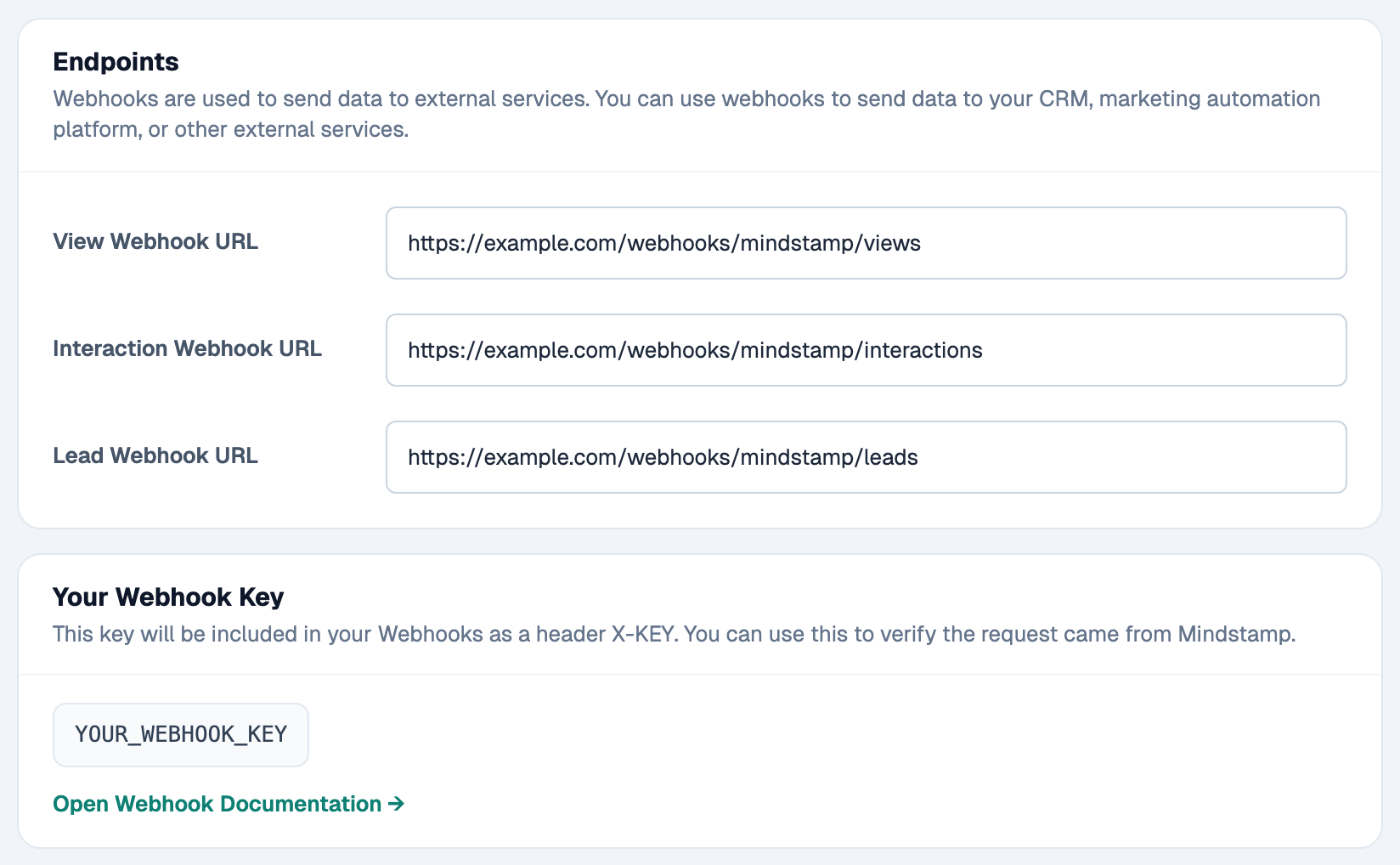
Example account settings. The URLs and key are placeholders.
Enable each video
- Open the video, then Integrations and Mindstamp API.
- Turn on Send View Webhooks, Send Interaction Webhooks, or Send Lead Webhooks.
- Leave a video URL blank to use the configured fallback, or enter a URL for that video.
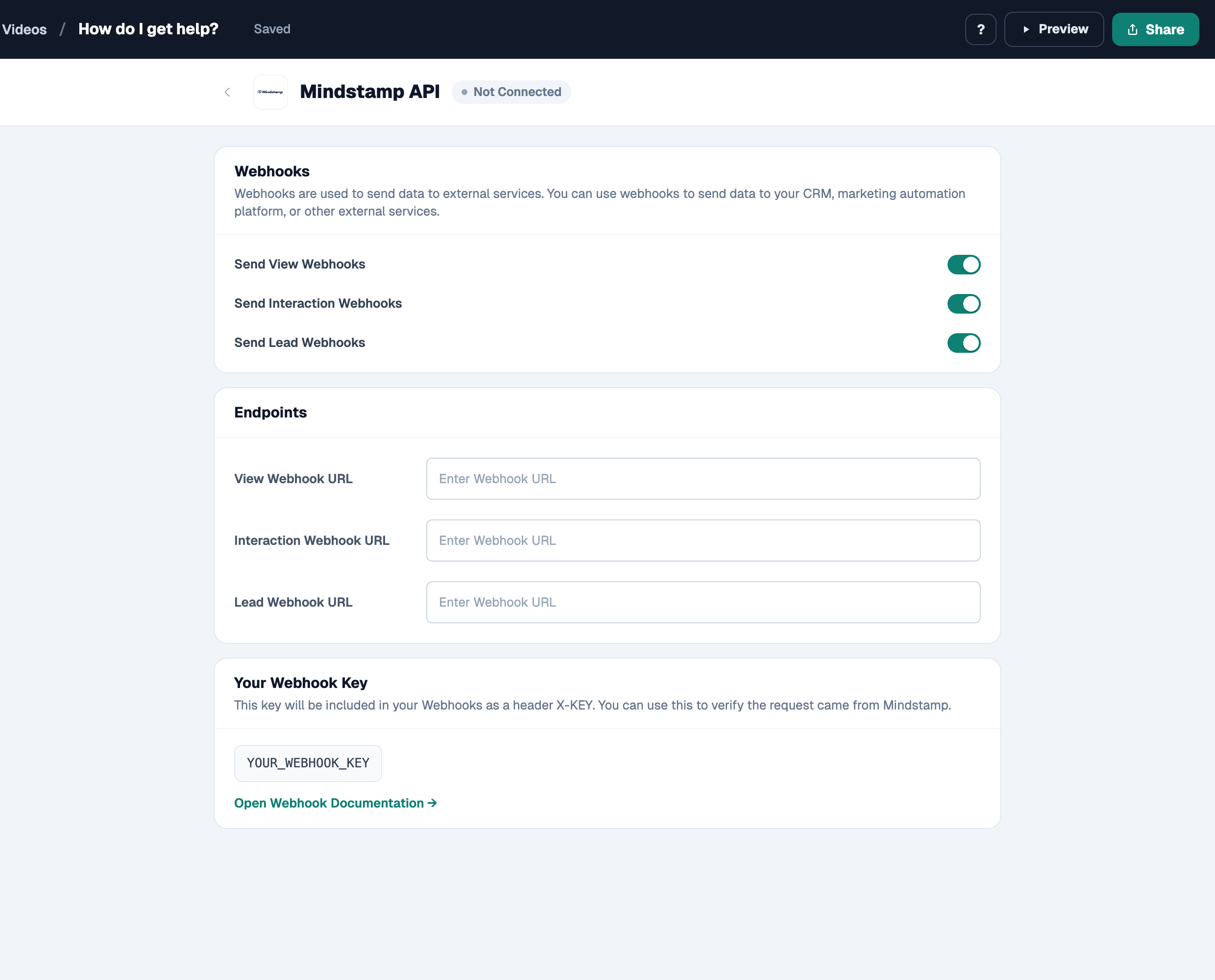
Example video settings. All webhook types are on; the blank URL fields use the fallback settings.
The sender checks URLs in this order: the video override, the organization's default, then the video owner's account URL. Account URLs alone do not enable webhooks on a video.
Request body and headers
Each POST body is the record itself. There is no top-level event or data wrapper. Use separate URL paths to identify the webhook type, for example:
/webhooks/mindstamp/views/webhooks/mindstamp/interactions/webhooks/mindstamp/leads
Mindstamp sends Content-Type: application/json and your webhook key in the X-KEY header. HTTP header names are case-insensitive. Reject a request if its key does not match your server's stored key. Use HTTPS for your public endpoint.
The payload pages show complete example POST bodies with fictional data. Fields can contain null, empty strings, empty arrays, or empty objects. Custom variables can have different value types. Allow additional fields so a new field does not break your receiver.
Verify a signed request
The current sender also includes these headers:
| Header | Value |
|---|---|
X-Mindstamp-Timestamp | Unix timestamp in seconds |
X-Mindstamp-Signature | t=<timestamp>,v1=<hex HMAC-SHA256> |
To verify the signature, use your webhook key as the HMAC key. The message is the timestamp, a period, and the exact raw request body bytes:
HMAC-SHA256(webhook_key, timestamp + "." + raw_body)
Compare the expected hex digest to the v1 value with a constant-time comparison. Require the t value to match X-Mindstamp-Timestamp. Check the timestamp against your application's accepted age and clock-skew policy to limit replay. Signature verification alone does not prevent repeat delivery.
Keep the raw body for this check. Parsing JSON and serializing it again can change whitespace or key order and invalidate the comparison. The receiver example below checks X-KEY; add signature verification before saving if your application requires signed-body checks.
Return a success response
Save the event, or place it in a durable queue, before you acknowledge it. Return 200 OK or 204 No Content. The current sender treats these two status codes as success. It does not require a JSON response body.
HTTP/1.1 204 No Content
Do slow work, such as updating a CRM, after you have saved the event. A timeout or another status code leaves the delivery marked unsuccessful. Do not depend on a fixed retry schedule or a guaranteed retry count.
Delivery timing and duplicate records
Mindstamp sends these webhooks during background processing of a finalized view. An interaction webhook can arrive after the viewer answered or clicked. A lead webhook can arrive after the viewer supplied contact data.
A finalized view can represent an ended session or an inactive session. Receipt of a view webhook does not mean the viewer watched the full video. Use percentage and your own completion rule.
Allow for processing delay. There is no fixed two-minute delivery guarantee. Do not depend on the order of requests.
Use (webhook type, id) as the record key in your database. A resumed view can send another snapshot with the same id. Use updated_at to avoid replacing newer view data with older data. Give interaction records a unique ID constraint. The interactions nested in a view can also arrive as separate interaction webhooks.
Lead delivery tracks success on the viewer record. After one successful lead delivery, later views do not cause another lead webhook for that viewer under the current sender. Use view webhooks for later activity.
Test your endpoint
- Start a receiver and configure its public HTTPS URL in Mindstamp.
- Enable the webhook type on a test video.
- Watch the shared video as a viewer. Answer a question or click a button. For a lead test, provide contact data as a new viewer.
- End the viewing session and allow background processing to finish.
- Check the incoming POST, the key, and your server's response code.
Editor previews can skip interaction tracking. Use the viewer link for this test. A local address such as localhost is not reachable from Mindstamp's servers.
For a receiver-only test, save the JSON example from the View Webhooks page as view.json. POST that file to your local endpoint:
curl -i http://localhost:3001/webhooks/mindstamp/views \
  -H 'Content-Type: application/json' \
  -H "X-KEY: $WEBHOOK_KEY" \
  --data-binary @view.json
This tests your receiver. It does not test Mindstamp delivery. The example below shows where to connect your database.
Example receiver
This Node.js example checks the webhook key and saves the event before it returns success. Supply saveEvent with a function that writes to your database or durable queue. The function must reject its promise if the save fails.
import { createServer } from 'node:http';
import { timingSafeEqual } from 'node:crypto';

export function createWebhookServer({ webhookKey, saveEvent }) {
  if (!webhookKey) throw new Error('A webhook key is required');
  const expectedKey = Buffer.from(webhookKey);
  const routes = {
    '/webhooks/mindstamp/views': 'view',
    '/webhooks/mindstamp/interactions': 'interaction',
    '/webhooks/mindstamp/leads': 'lead'
  };

  return createServer(async (req, res) => {
    const type = routes[new URL(req.url, 'http://localhost').pathname];
    if (!type || req.method !== 'POST') {
      res.writeHead(404).end();
      return;
    }
    const receivedKey = Buffer.from(req.headers['x-key'] ?? '');
    if (receivedKey.length !== expectedKey.length ||
        !timingSafeEqual(receivedKey, expectedKey)) {
      res.writeHead(401).end();
      return;
    }

    let body;
    try {
      const chunks = [];
      for await (const chunk of req) chunks.push(chunk);
      body = JSON.parse(Buffer.concat(chunks).toString('utf8'));
      if (!body || Array.isArray(body) || typeof body.id !== 'string') {
        res.writeHead(400).end();
        return;
      }
    } catch {
      res.writeHead(400).end();
      return;
    }

    try {
      await saveEvent(type, body);
      res.writeHead(204).end();
    } catch {
      res.writeHead(500).end();
    }
  });
}
Configure request-body size and traffic controls for your application's payloads. View bodies grow with their nested interactions. This example leaves those deployment settings to your application.
For saveEvent, use a unique key for (type, id). Store newer view snapshots on that key. Ignore duplicate interactions that your application has processed. Return success for a duplicate that you have already saved.